
Authorize.Net is a long-established US-based payment gateway that processes credit and debit card payments. It is widely used by North American businesses that need a reliable, PCI-compliant gateway without merchant-of-record complexity. WP SmartPay Pro supports Authorize.Net via its Accept.js hosted payment form.
Prerequisites
- An Authorize.Net account. You will also need a separate merchant bank account — Authorize.Net is a payment gateway, not a payment processor with built-in banking.
- Your Authorize.Net API Login ID and Transaction Key.
- WP SmartPay Pro with a valid license.
- HTTPS on your site.
Country Availability
Authorize.Net is primarily available to businesses in the United States, Canada, United Kingdom, Europe, and Australia.
Finding Your Authorize.Net Credentials
- Log in to your Authorize.Net Merchant Interface.
- Go to Account → Settings → API Credentials & Keys.
- Copy your API Login ID.
- Click New Transaction Key to generate and copy a Transaction Key.
- For sandbox: create a free Authorize.Net Sandbox account and follow the same steps to get test credentials.
Connecting Authorize.Net in SmartPay
- Go to SmartPay → Settings → Payment Gateways.
- Find Authorize.Net and tick Enable.
- Enter your Live API Login ID and Live Transaction Key.
- Enter your Test API Login ID and Test Transaction Key (from the sandbox account).
- Click Save Settings.
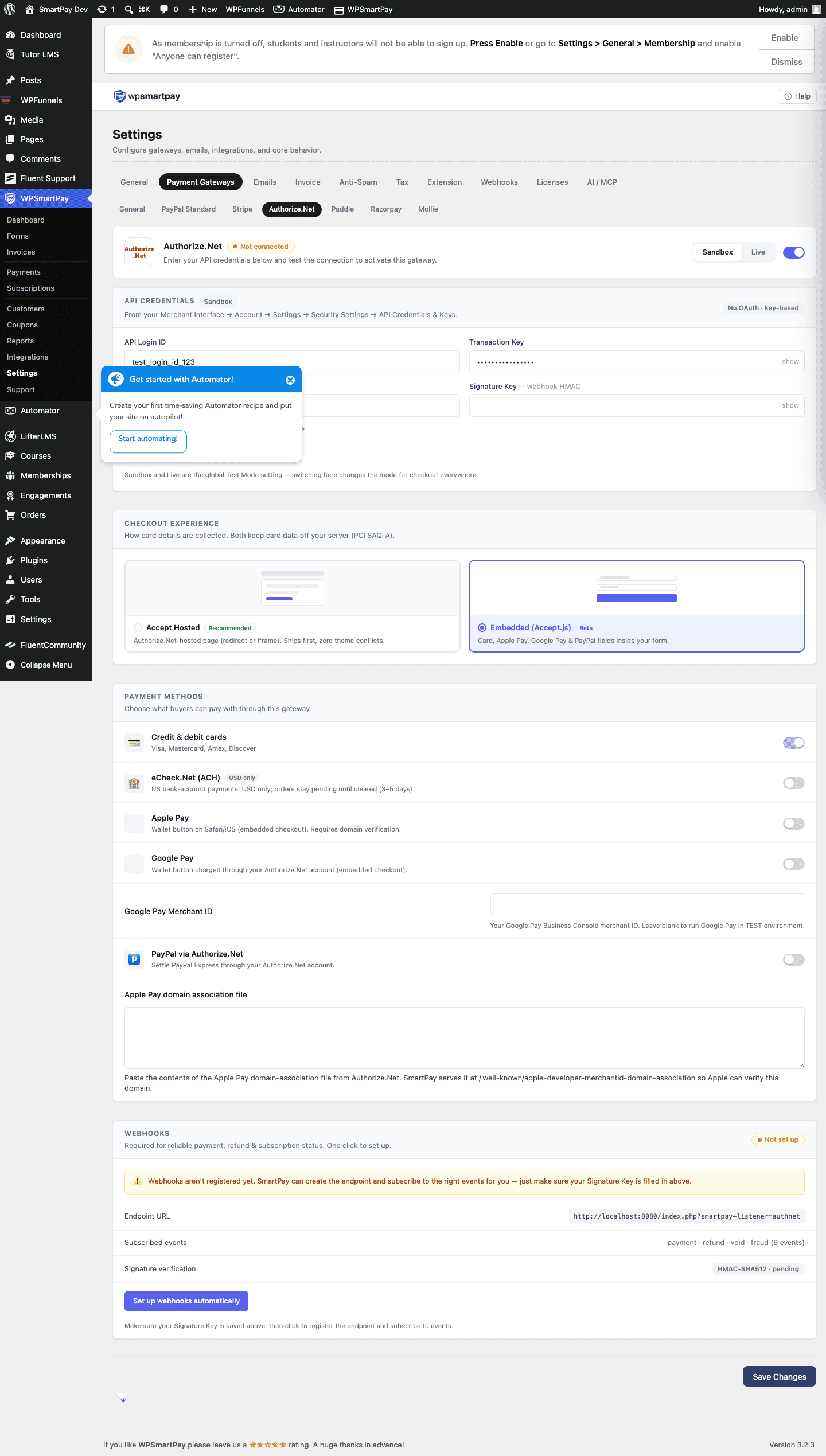
Test Mode Configuration
Toggle Test Mode on in SmartPay. Use these test card numbers with the sandbox credentials:
| Card Number | Result |
|---|---|
4007000000027 | Always succeeds (Visa) |
4012888818888 | Always succeeds (Visa) |
4000000000000002 | Always declines |
Supported Payment Methods
- Visa, Mastercard, American Express, Discover, JCB, Diners Club
- eCheck (ACH bank transfer) — requires additional Authorize.Net activation
Supported Currencies
USD (primary), CAD, GBP, EUR, and others depending on your merchant account configuration.
Common Errors & Fixes
- "The API Login ID or Transaction Key is invalid" — Credentials from the wrong environment (sandbox vs production). Verify which mode SmartPay is in and use the matching set.
- "This transaction has been declined" — In live mode, the card was declined by the issuing bank. In test mode, check you are using the correct test card numbers above.
- Duplicate transaction error — Authorize.Net's duplicate detection flags identical transactions within a short window. If a customer double-submits, the second attempt may be declined with a duplicate error.