





Nobody searches “GiveWP alternative” because GiveWP is bad. It’s the most-installed donation plugin on WordPress — 100,000+ active installs and a 92% rating from over 700 reviews — it’s well built, and its free core does what it promises.
People search for an alternative for two specific reasons:
- The add-on bill. GiveWP’s free core takes one-time donations. The things a growing organization actually needs — recurring donations, fee recovery, CRM connections, peer-to-peer — are paid add-ons or bundle tiers, and the annual total climbs fast.
- It only does donations. If your organization also sells anything — event tickets, courses, memberships, merch — GiveWP can’t help, and you end up running WooCommerce alongside it.
WP Smart Pay is built for exactly those two gaps. Here’s the honest comparison.
The Short Version
| WP Smart Pay | GiveWP | |
|---|---|---|
| One-time donation campaigns | Yes | Yes |
| Campaign goals & progress bars | Yes | Yes |
| Recurring donations | Included in Pro | Paid add-on / bundle |
| Donor management & receipts | Yes (PDF receipts) | Yes |
| Also sells products, tickets, subscriptions | Yes | No — donations only |
| Gateways | Stripe, PayPal, Mollie, Paystack, Razorpay + more | Stripe/PayPal free (with fee on free tier), more via add-ons |
| Platform fee on gifts | None | On the free tier |
| Invoicing | Built in | No |
| AI agent control (MCP + CLI) | Yes | No |
| Peer-to-peer, text-to-give | No | Yes (add-ons) |
| Active installs | Newer, smaller | 100,000+ |
GiveWP: What You’re Actually Getting
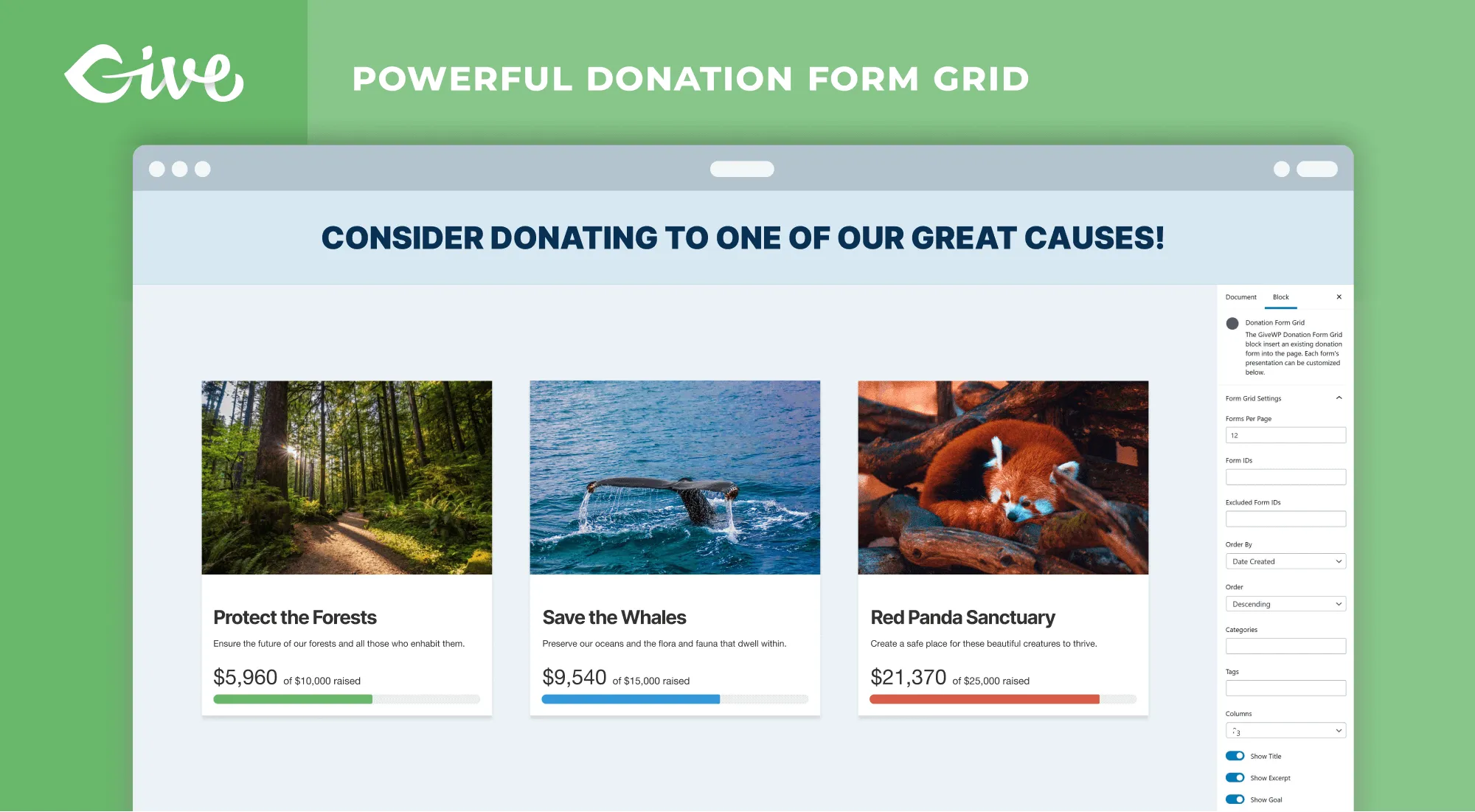
GiveWP has spent a decade building fundraising-specific machinery, and it shows. The visual form builder produces genuinely good multi-step donation flows, the donor management is purpose-built for nonprofits rather than retrofitted from e-commerce, and the add-on catalog covers fundraising patterns that essentially nobody else on WordPress addresses.
Pros
- The deepest fundraising feature set on WordPress — peer-to-peer, text-to-give, tributes, fee recovery
- A capable free core for straightforward one-time donation campaigns
- 100,000+ installs means abundant tutorials, agency familiarity, and community answers
- Purpose-built nonprofit reporting and donor records
Cons
- Recurring donations — the single highest-value fundraising feature — sit behind a paid add-on or bundle
- The free tier adds a platform fee to every gift
- Donations only; any other revenue stream needs a second commerce plugin
- Add-on costs compound: three or four “essentials” and you’re at a serious annual number
WP Smart Pay: What’s Different
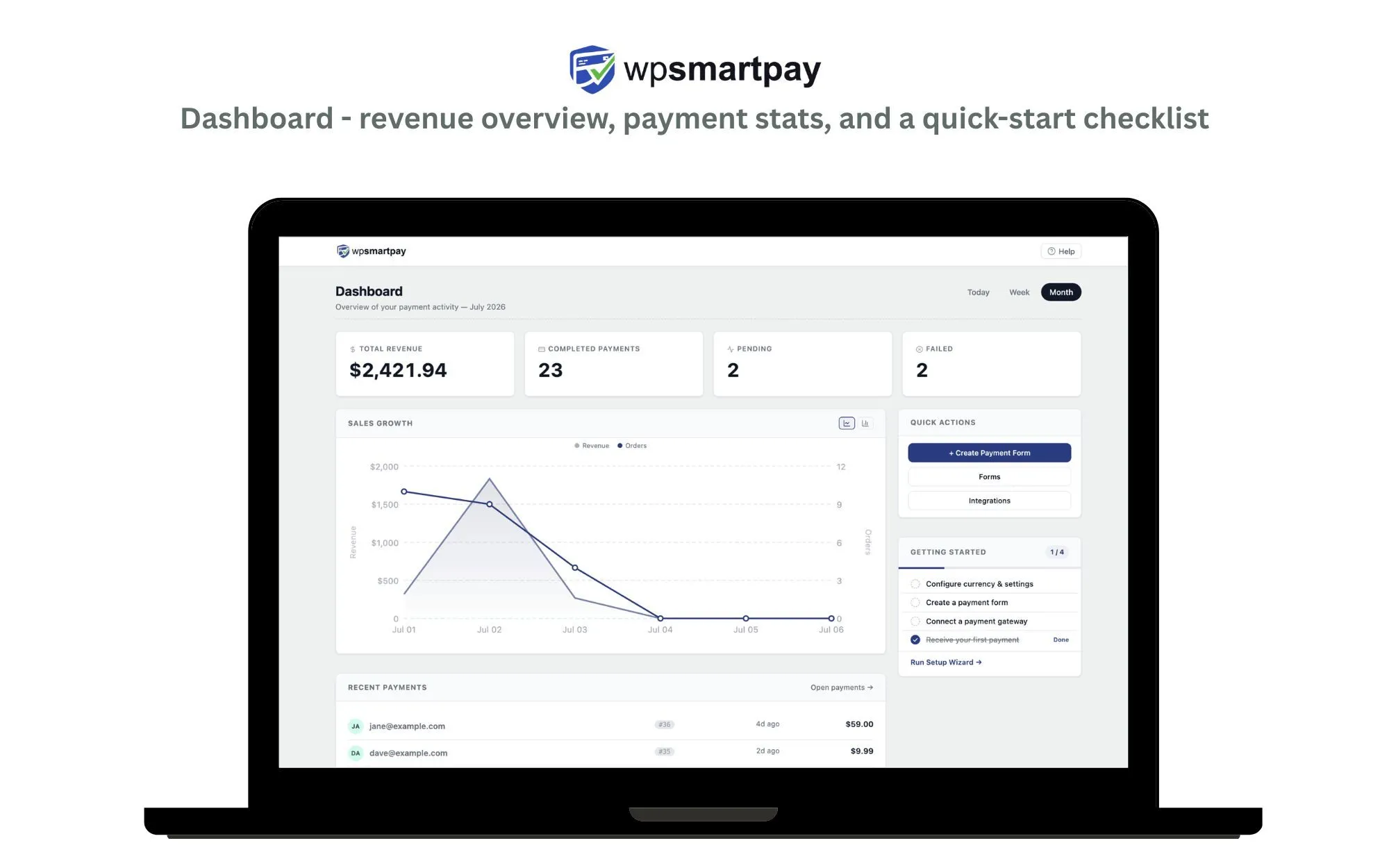
Pros
- Donations, payments, subscriptions, and invoices in one system with one dashboard
- Recurring giving included in Pro rather than priced separately
- No platform fee on gifts at any tier
- Global gateway coverage — Mollie, Paystack, Razorpay alongside Stripe and PayPal, 150+ currencies
- The only donation plugin an AI agent can operate through MCP
Cons
- No peer-to-peer or text-to-give — if those are central, GiveWP wins outright
- Stripe is a Pro gateway; the free version ships with PayPal Standard
- Much newer, with a smaller community and fewer nonprofit-specific tutorials
- Not nonprofit-exclusive by design — some GiveWP reporting is more tailored to fundraising language
Where WP Smart Pay Wins
One Plugin for Every Way You Get Paid
This is the structural difference. A food bank selling fundraiser-dinner tickets, a church collecting both tithes and retreat fees, a creator taking tips and selling a course — with GiveWP each of those needs a second commerce plugin. With WP Smart Pay, donations, payments, subscriptions, and invoices are one system with one dashboard and one donor/customer record.
Recurring Giving Without the Add-on Math
Monthly donors are the highest-value supporters you have — a recurring gift is typically worth several times a one-time donation over its lifetime. In WP Smart Pay Pro, recurring donations are simply included: daily to yearly schedules, self-serve donor management. With GiveWP, price the recurring add-on or the bundle that contains it before you compare totals.
Global Gateways
GiveWP’s gateway list is add-on-driven and US-centric at the free level. WP Smart Pay Pro ships Stripe, PayPal, Mollie (iDEAL and European methods), Paystack (Nigeria, Ghana), Razorpay (India), and more — with 150+ currencies. If your supporters aren’t all in North America, this matters on day one.
Launch a Campaign From a Prompt
WP Smart Pay ships an MCP server and CLI, so your AI agent can create the campaign: “Set up a $5,000 clean-water campaign, $10/$25/$100 suggested, monthly giving on.” No other donation plugin can do this.
See it next to GiveWP on your own campaign
Recurring giving included, 150+ currencies, and one plugin for donations and everything else you charge for.
Where GiveWP Wins
Being honest — you’re reading this on WP Smart Pay’s blog, so weigh accordingly:
- Fundraising-specific depth. Peer-to-peer campaigns, text-to-give, tribute donations, fee recovery (asking donors to cover processing costs) — GiveWP’s add-on catalog covers fundraising patterns we don’t.
- Track record and community. A decade of development, 100,000+ installs, and abundant tutorials. If you want the most-trodden path, this is it.
- Free Stripe donations. GiveWP’s free tier takes card donations (with an added platform fee per gift on free); WP Smart Pay’s free tier is PayPal Standard, with Stripe in Pro.
- Nonprofit-native reporting. Its dashboards speak fundraising, not commerce.
If peer-to-peer or text-to-give is central to your fundraising model, stay with GiveWP — genuinely.
Which One Fits You
| Your situation | The better pick |
|---|---|
| Peer-to-peer or text-to-give is core to your model | GiveWP |
| You fundraise and sell tickets, courses, or merch | WP Smart Pay |
| Monthly donors are your growth plan | WP Smart Pay (recurring included) |
| Supporters are largely outside North America | WP Smart Pay (Mollie, Paystack, Razorpay) |
| You want the most-documented, most-supported option | GiveWP |
| You need free card donations today, at any cost | GiveWP free tier (mind the per-gift fee) |
| You want your AI assistant running campaigns | WP Smart Pay |
Migration: What Moves and What Doesn’t
There’s no one-click migration between the plugins. In practice a switch looks like:
- Recreate campaigns in WP Smart Pay (minutes each with Gutenberg blocks — or hand your agent the list).
- Point your donate buttons/menus at the new forms.
- Existing recurring donors: subscriptions created through Stripe/PayPal continue in the gateway; new recurring signups flow through WP Smart Pay. Plan a gentle email asking long-term donors to re-subscribe as their old schedules lapse.
- Export donor records from GiveWP (CSV) for your archives.
- Keep GiveWP installed but deactivated for a few weeks until you’re confident, then remove it.
Run both in parallel for one campaign before committing. It costs nothing and answers most of your questions faster than any comparison table.
Frequently Asked Questions
Will I lose my donor history if I switch? Not if you export first. GiveWP exports donors and donations to CSV, which you keep as your archive. Historical records don’t import into WP Smart Pay automatically, so most organizations treat the switch as a clean start with the old data archived.
What happens to existing recurring donors? Subscriptions live in Stripe or PayPal, not in the plugin, so they keep charging. What changes is where new recurring signups are created. Plan to migrate long-term donors gradually as their schedules lapse.
Is WP Smart Pay free? There’s a free version on wordpress.org with PayPal Standard. Stripe, the other gateways, recurring giving, and the MCP server are in Pro.
Can I run both plugins at once? Yes, and it’s the recommended way to evaluate. They don’t conflict — run one campaign on each and compare the reporting and donor experience yourself.
Does WP Smart Pay take a cut of donations? No. You pay your gateway’s processing rate and nothing to us, on every tier.
Bottom Line
Stay with GiveWP if you need its deep fundraising-specific add-ons and don’t mind the annual bundle. Switch to WP Smart Pay if you want recurring giving included, supporters outside North America, one plugin for donations and everything else you charge for — or if “our AI agent runs the campaigns” sounds like the decade you’re planning for. The free version is on wordpress.org; run it next to GiveWP and compare with your own campaign.
GiveWP install counts and ratings cited above are from wordpress.org, August 2026.
Try it alongside GiveWP
The free version is on wordpress.org — run one campaign on each and compare the reporting and donor experience with your own donors.